
AWS vs Google Cloud vs Azure: How to Choose the Right Cloud for Your Business
“Which cloud is best?” is one of the first questions we hear in cloud consulting. The honest answer is that there is no single best cloud. AWS, Google Cloud and Microsoft Azure are all mature, secure and capable of running almost any business workload. What differs is how well each one fits your existing systems, your team, your data rules and the way you want to pay.
At RNA Technology, we design and migrate workloads on all three as part of our cloud consulting and migration work, and we recommend whichever fits the client. This guide walks through the factors that actually decide the choice, so you can make it on evidence rather than on habit or a sales pitch.
The three providers at a glance
The three providers lead the market. Synergy Research Group estimates that in Q2 2026, Amazon held 28% of the worldwide cloud infrastructure services market, Microsoft 20% and Google 15%, in a quarter worth about $143 billion and growing 43% year on year. Microsoft and Google are growing faster than Amazon, but all three are expanding quickly, largely on AI demand.
Market share tells you that all three are safe bets that will be around for a long time. It does not tell you which one suits you.
Six factors that decide the choice
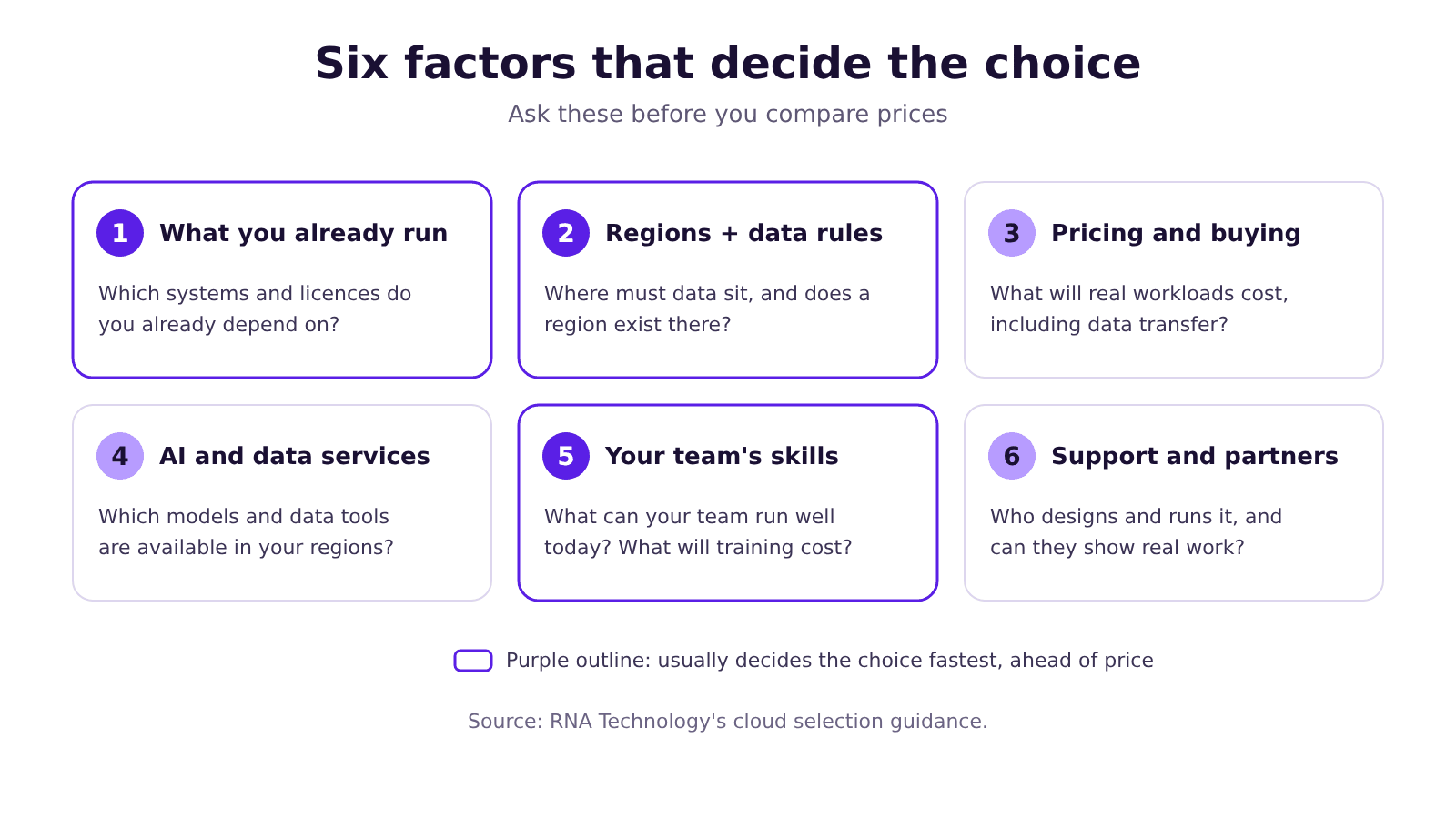
1. What you already run
Your current systems usually narrow the choice faster than anything else.
- Microsoft-heavy environments (Microsoft 365, Entra ID / Active Directory, Windows Server, SQL Server, .NET) often fit naturally on Azure. Identity integration is simpler, and existing Windows Server and SQL Server licences can be reused on Azure.
- Google Workspace users and analytics-heavy teams often find Google Cloud a natural fit, particularly around BigQuery and its data and AI tooling.
- Teams that want the widest choice of services and a large pool of engineers who know the platform often start with AWS, which has the longest track record and the largest market share.
These are tendencies, not rules. Plenty of Microsoft 365 companies run happily on AWS, and plenty of startups build on Azure.
2. Regions and data residency in Southeast Asia
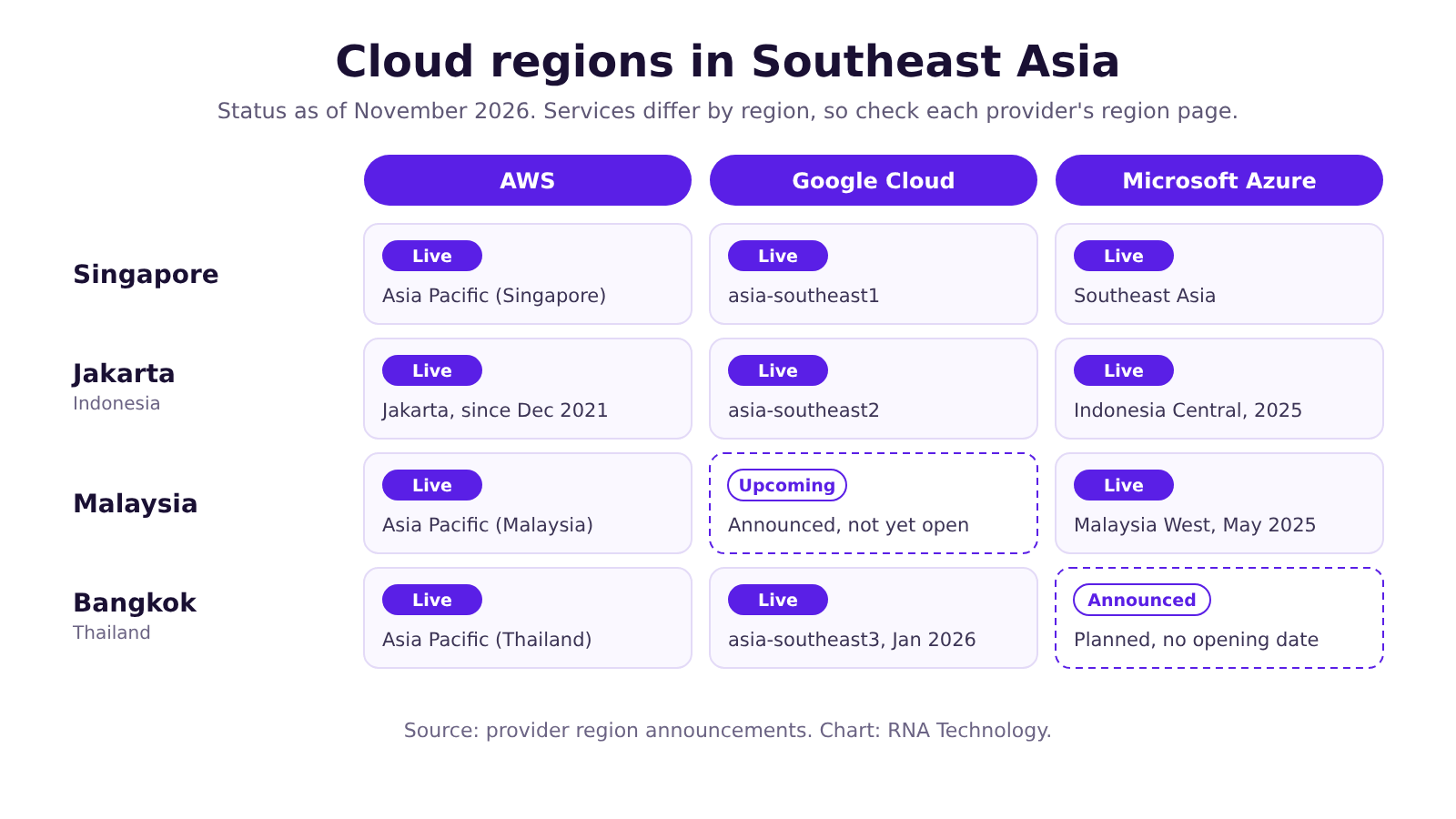
Where your data sits matters for latency, for regulation and sometimes for customer contracts. All three providers have Singapore regions, and coverage across the rest of the region has grown quickly:
What the rules say, in brief (this is not legal advice):
- Singapore: the PDPA does not require personal data to stay in Singapore, but its Transfer Limitation Obligation still applies when a cloud provider stores or processes data overseas. The PDPC’s guidance makes clear that the organisation using the cloud remains responsible for meeting this obligation, including for overseas transfers made by its cloud provider. Financial institutions also need to follow MAS guidance on outsourcing and technology risk.
- Indonesia: under Government Regulation 71 of 2019, public-scope electronic system operators generally must keep their systems and data in Indonesia, while private-scope operators may host offshore but must allow supervisory access by Indonesian authorities. Sector rules, especially in financial services, can add stricter requirements, and newer laws such as the Personal Data Protection Law add conditions on cross-border transfers, so check the current position with counsel.
- Other markets: Malaysia, Thailand, Vietnam, the Philippines and Australia each have their own rules. If you operate across several countries, the provider with an in-country region where you need it may decide the choice for you.
3. Pricing and how you buy
List prices for comparable virtual machines and storage are close enough that they rarely decide the choice on their own. What matters more:
- Discount models. Each provider offers discounts for one- or three-year commitments, under different names and with different flexibility. Google Cloud also applies sustained use discounts automatically on certain machine types.
- Existing agreements. If you already own Windows Server or SQL Server licences, Azure Hybrid Benefit lets you apply them on Azure. Existing Microsoft or Google contracts can also bring cloud credits or bundled terms that change the maths.
- Data transfer. Moving data out of a cloud, or between regions, is charged on all three and is often missing from early estimates. Workloads that serve a lot of data to the internet, or that sync between clouds, deserve a careful estimate. The exception is leaving a provider entirely: AWS and Google Cloud waive the fee for customers who move all their data out, with conditions.
- Startup and migration programmes. All three run credit programmes for startups and migration funding for qualifying projects, often arranged through partners.
Compare on a like-for-like estimate of your real workloads, using each provider’s pricing calculator, not on headline rates. Our guide to cloud cost optimization covers how to keep the bill under control once you have chosen.
4. AI and data services
AI is now a big part of why companies pick a cloud, and all three are investing heavily:
- AWS offers Amazon Bedrock, with access to models from several providers, plus SageMaker for building and training your own.
- Google Cloud offers Vertex AI with Google’s Gemini models and a wide model garden, closely linked to BigQuery.
- Azure offers Microsoft Foundry (formerly Azure AI Foundry), including OpenAI models, closely linked to Microsoft 365 and Copilot.
Model choice changes fast. Instead of picking a cloud for one model, check whether the platform gives you access to the models you need, in the regions you need, under the data terms you need.
5. Your team’s skills
A cloud your team can run well beats a theoretically better cloud they cannot. Check what your engineers already know, how easy it is to hire for each platform in your market, and how much training the move would need. Retraining a whole team is a real cost and should be counted against any saving.
6. Support and partners
All three offer paid support plans and partner networks. For many mid-sized companies, the quality of the partner who designs and runs the environment matters as much as the platform. Ask any partner which certifications and partner tiers they hold, and whether they can show work they have done on the platform.
Quick comparison
| If this sounds like you | Often a good fit | Check before deciding |
|---|---|---|
| Heavy Microsoft 365, Windows Server or SQL Server use | Azure | Service availability in your target region |
| Data and analytics at the centre, or already on Google Workspace | Google Cloud | Regional coverage for every country you operate in |
| Want the broadest service range and the largest pool of skilled engineers | AWS | Commitment and data transfer costs |
| Strict data residency in a specific country | Whichever has an in-country region | That the specific services you need are offered there |
| Startup with limited cloud experience | The one your team knows best, plus available credits | Lock-in to proprietary services |
This table reflects common patterns we see, not a rule. Your workloads decide.
Should you use more than one cloud?
Sometimes, but rarely by default. Running workloads on two or more clouds makes sense when:
- a specific service is clearly better on another platform, such as an analytics or AI tool;
- a regulation or contract requires a region only one provider offers;
- you acquire a company that already runs on a different cloud.
It usually does not make sense as a general hedge. Multi-cloud doubles the skills you need, complicates security and monitoring, and adds data transfer costs between providers. A well-architected setup on one cloud, with backups and a documented exit plan, is the better answer for most mid-sized businesses.
Mistakes we see
- Choosing on headline price. Small differences in list prices are usually outweighed by discounts, licensing and data transfer.
- Ignoring data transfer. Costs to move data out, or between regions, often show up only after the migration.
- Choosing a cloud nobody on the team can run. Skills gaps turn into slow projects and expensive mistakes.
- Assuming every service exists in every region. Newer regions often launch with a core set of services and add others later.
- Locking in too early. Signing a three-year commitment before you have measured real usage can leave you paying for capacity you do not need.
Key takeaways
- There is no single best cloud. AWS, Google Cloud and Azure are all mature and secure.
- Your existing stack, data residency needs and team skills usually decide the choice faster than price.
- Check that the specific services you need exist in the specific regions you need.
- Compare costs on a like-for-like estimate of your real workloads, including data transfer.
- Default to one well-run cloud. Add a second only for a clear reason.
Frequently asked questions
Which is cheaper: AWS, Google Cloud or Azure?
None is consistently cheaper. List prices for comparable resources are close, and the real cost depends on your workloads, discounts, licensing and data transfer. The only reliable comparison is an estimate built from your own usage.
Which cloud is most secure?
All three meet major international security certifications and offer strong security tooling. Security follows a shared responsibility model: the provider secures the infrastructure, and you secure how you configure and use it. Misconfiguration, such as public storage or weak access controls, is a risk you control whichever cloud you choose.
Do all three have data centres in Singapore?
Yes. AWS, Google Cloud and Azure all run cloud regions in Singapore, and all three also have regions in Jakarta.
Can we move from one cloud to another later?
Yes, but it takes effort, especially if you rely heavily on a provider’s proprietary services. AWS and Google Cloud now waive data transfer fees for customers leaving entirely, with conditions, so the bigger cost is usually engineering time. Using containers, open-source databases and infrastructure as code where it makes sense keeps future moves easier.
Do you only work with AWS?
No. We work across AWS, Google Cloud and Azure and recommend what fits each client. We are also an AWS Advanced Tier Services Partner.
How long does a cloud selection and migration plan take?
It depends on how many systems you run and how complex they are. We scope this with you before starting.
Talk to RNA Technology
RNA Technology is an AI automation and cloud consultancy serving businesses in Singapore, Indonesia and beyond, working across AWS, Google Cloud and Azure. If you are weighing up providers or planning a migration, book a free 30-minute cloud consultation or see how our cloud engagements work.
Sources
- Q2 Cloud Market Passes $143 Billion; Highest Growth Rate in Eight Years — Synergy Research Group, 30 July 2026
- Now Open – AWS Asia Pacific (Jakarta) Region — AWS News Blog, 13 December 2021 (product fact only)
- AWS launches Malaysian cloud region — DatacenterDynamics
- AWS launches Asia Pacific (Thailand) Region — Business Wire, 7 January 2025 (product fact only)
- General Availability of Indonesia Central Cloud Region — Microsoft Indonesia, 15 April 2025 (product fact only)
- Microsoft launches Malaysia West cloud region, its first in the country — The Star, 28 May 2025
- Microsoft Deepens Thailand Partnership with more than US$1 billion Investment — Microsoft Source Asia, 31 March 2026 (product fact only)
- Google Cloud launches new region in Bangkok, Thailand — Google Cloud Blog (product fact only)
- Google investment in Malaysia digital infrastructure — Google Malaysia Blog, November 2026 (product fact only)
- Cloud locations — Google Cloud (product fact only)
- Sustained use discounts — Google Cloud documentation (product fact only)
- Azure Hybrid Benefit — Microsoft Azure (product fact only)
- Free data transfer out to internet when moving out of AWS — AWS News Blog, 5 March 2024 (product fact only)
- Eliminating data transfer fees when migrating off Google Cloud — Google Cloud Blog, 11 January 2024 (product fact only)
- Advisory Guidelines on Key Concepts in the Personal Data Protection Act — PDPC Singapore
- Advisory Guidelines on the PDPA for Selected Topics, Chapter 8: Cloud Services — PDPC Singapore, 9 October 2019
- Cloud — Monetary Authority of Singapore
- Indonesia: New Regulation on Electronic Systems and Transactions (GR 71/2019) — Global Compliance News, 7 November 2019